Secure Boot with RTSL Settings#
Secure Boot with RTSL is a security feature available on Silicon Labs Series 2 and Series 3 devices. It validates the integrity and authenticity of each firmware image before the image is allowed to run on the device.
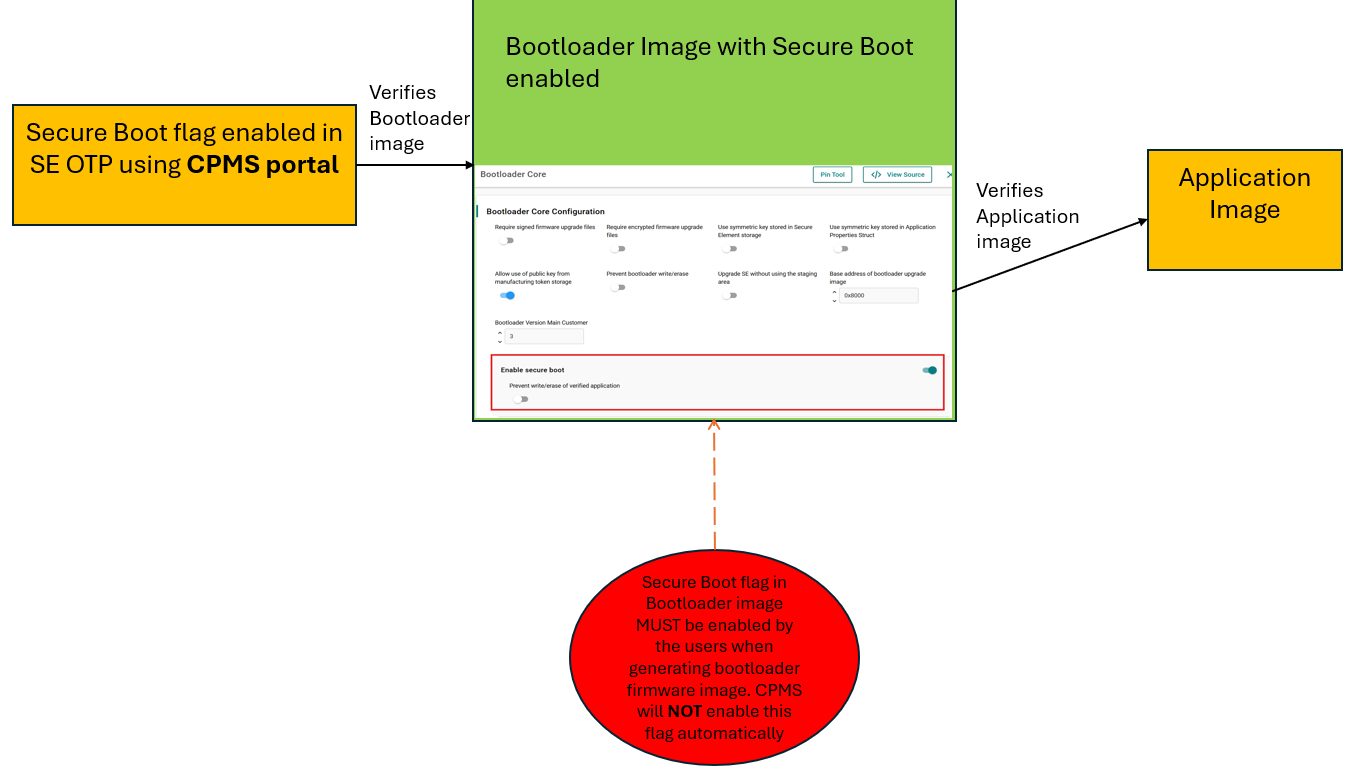
Establishing a complete root of trust requires enabling secure boot in both the device OTP and the user-generated bootloader. The secure boot setting stored in device OTP causes the first-stage bootloader in the Secure Engine to verify the signature of the user-generated and signed second-stage bootloader.
The next link in the chain of trust is established by enabling secure boot in the second-stage bootloader. This setting causes the second-stage bootloader to verify the signature of the application image before execution.
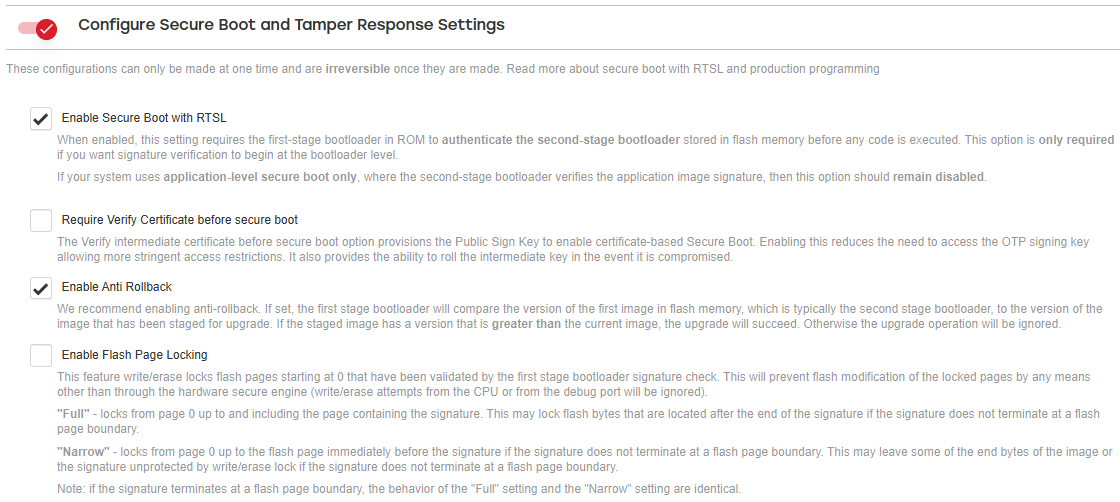
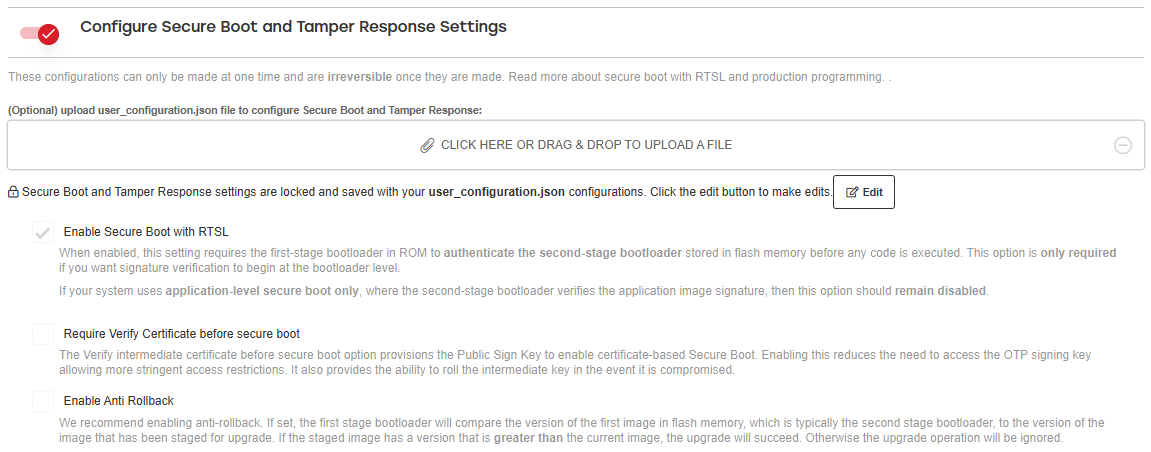
In CPMS, you can quickly configure the OTP settings required for secure boot. Because OTP settings are irreversible, review each setting carefully before making a selection.
The Secure Boot with RTSL OTP settings include:
Enable bit
Certificates Required bit
Anti-Rollback Enable bit
Flash page locking settings
For detailed information about these settings, see Series 2 Secure Boot with RTSL.
After you select these settings, CPMS prompts you to provide a Secure Boot Key, also known as a public sign key. This key is used verify the firmware image signed by the corresponding private key.
For more information about the public sign key, see Secure Boot Key.
The following figure shows the Secure Boot configurations available in CPMS for Series 2 devices.
The following figure shows the Secure Boot configurations available in CPMS for Series 3 devices.
As described earlier, establishing a complete root of trust for secure boot requires enabling secure boot in both the device OTP and the bootloader image uploaded through CPMS. If Secure Boot with RTSL is enabled in OTP but secure boot is not enabled in the bootloader, the device verifies only the bootloader image signature. In this configuration, the application image signature is not verified.
Silicon Labs recommends establishing a complete root of trust to reduce the device attack surface. For instructions on creating a bootloader project with secure boot enabled, see Generating the Bootloader.
Important: Enabling Secure Boot in the CPMS portal enables Secure Boot only in the Secure Engine (SE) OTP. To complete the root of trust, Secure Boot must also be enabled in the bootloader (BTL) image to ensure that the application image signature is verified. Both configurations are required to establish a complete Secure Boot chain.
Enabling Secure Boot with RTSL on a VSE Device#
A few extra steps are required to establish a full root of trust when enabling secure boot on a Virtual SE (VSE) device in CPMS. As outlined previously, the secure boot settings in OTP will need to be enabled and a public signing key should be uploaded to CPMS as the first steps to enable secure boot. This public signing key will be provisioned in the device’s OTP memory by CPMS and will be used by the device to verify the signature on the second stage bootloader. For the second stage bootloader to verify the signature on the application on a VSE part, the bootloader will use the public signing key stored in the top page of main flash. Refer to Series 2 Secure Boot with RTSL for more information on enabling secure boot with RTSL on a VSE device.
Follow the steps outlined in this section to place the public signing key in flash using a token file.
When creating a public and private signing key pair for secure boot, use the
--tokenfileflag to write the public signing key to a token file. For more information, see Util Commands.commander util genkey --type ecc-p256 --privkey sign_privkey.pem --pubkey sign_pubkey.pem --tokenfile sign_pubkey.txtFlash the signed bootloader and application images to the device using the command described in step 3. For instructions on generating and signing bootloader and application images, see the Provision Public Sign Key and Secure Boot Enabling section in Examples - Series 2 and Series 3 Secure Boot with RTSL.
Flash the token file to the device using the
flashcommand. For more information, see Util Commands.commander flash --tokenfile sign_pubkey.txtTo provision the OTA decryption key on a VSE device, follow the steps in OTA Decryption Key for VSE Devices.
An OTA decryption key is required when the Required Encrypted Upgrade Images flag is enabled.
Use the
readmemcommand to dump the flash contents, including the token file, signed bootloader, and signed application firmware, to a HEX file. For more information, see Dump Flash Contents to File.commander readmem --region @mainflash --outfile all.hexBefore uploading the file to the CPMS portal, flash all.hex to a test device to verify that the application runs correctly.
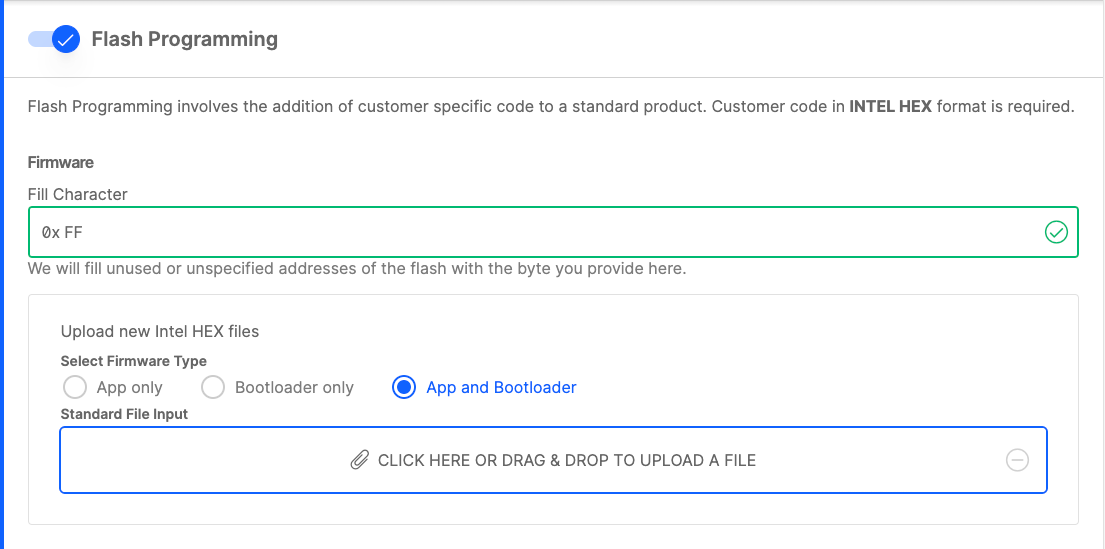
Upload the file all.hex to CPMS using the App and Bootloader selection in the Flash Programming section. As mentioned, this hex image should contain the token file, signed bootloader, and signed application. This will establish a full root of trust on the VSE device, ensuring that only authentic firmware can run on the device.