


Wi-Fi Commander User Guide#
This guide explains how to install and set up Wi-Fi Commander, then use key features such as Access Point mode, Client mode, roaming, and MQTT operations.
Prerequisites#
Software Requirements#
Simplicity Studio version 6
Hardware Requirements#
Wireless Starter Kit (WSTK) or Wireless Pro Kit (WPK)
SiWx917 Radio Board (BRD4338A Rev A12 or later)
Board must operate in SoC mode
Firmware#
WiSeConnect SDK version 3.5.0
Getting Started#
Install Required Software#
Download and install Simplicity Studio version 6.
Open Simplicity Studio.
Add the WiseConnect SDK extension.
How to Open Wi-Fi Commander#
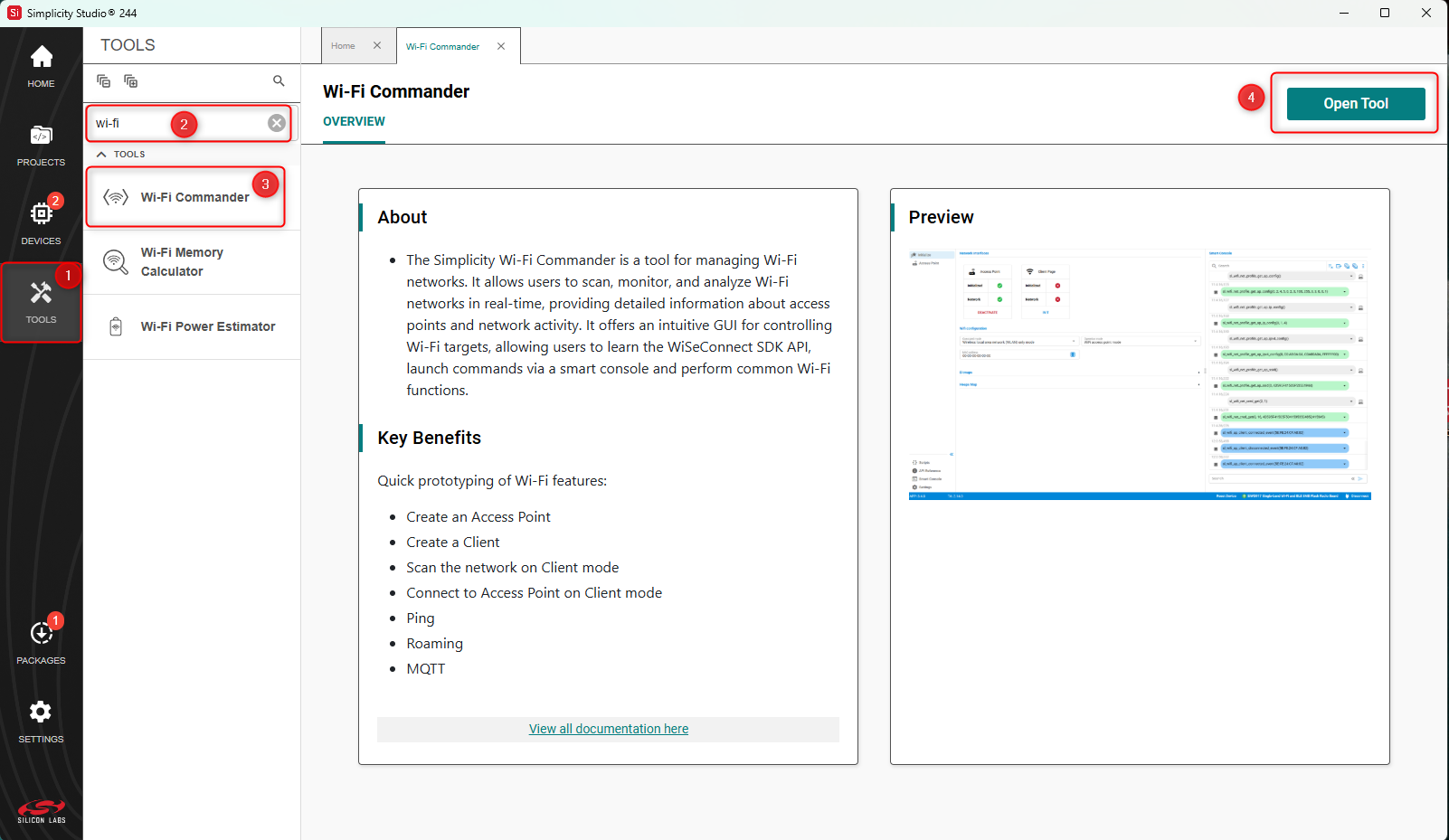
In Simplicity Studio v6, select Tools.
In the Filter box, enter Wi-Fi.
In the Tools list, select Wi-Fi Commander.
Click Open Tool in the upper-right corner.
See Connecting to the End Device for instructions on configuring your device to communicate with Wi-Fi Commander.