


Power Manager Architecture#
The Power Manager is a platform level service that manages the M4 power states and their transitions when requested by the application. These requirements are set by the different software modules (drivers, stacks, application code, and so on).
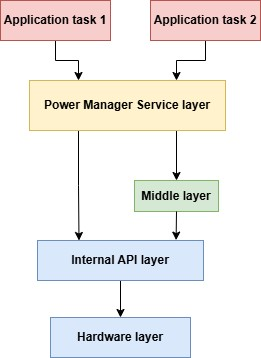
Application tasks represent tasks running in the application. Users call the Power Manager service APIs from the application tasks.
Power Manager Service Layer interacts with the application layer tasks. It is a layer over the existing internal core API layer simplifies the process for users to develop their applications.
Middle Layer is a supporting layer for Power Manager service. It validates the power state transitions.
Internal API Layer is the low-level driver which interacts with hardware layer where the register level configurations are done.
Features of Power Manager#
It is an Interface between software modules and the device, offering APIs to efficiently manage and configure the power state transitions of SiWG917.
The SiWG917 M4 entry into a power state is determined by the requirements. Using the requirement APIs, requirements for a specific power state can be added or removed.
It offers a notification mechanism, providing an option for subscribing/unsubscribing to events during state transitions, i.e., while entering or leaving any state. Based on the subscription, the Power Manager provides notifications through a callback function to the application. The notification events include Power State Transition, exit from sleep, and exit from standby mode. The main purpose of these notifications is for different software modules to adapt to the new power state.
The Power Manager checks if it is ok to sleep and then enters the sleep.
The clock scaling feature in differentiating system clock configuration in PS4 and PS3 active state is done. It can be switched between performance and power-save. By-default it is configured as power-save at the time of state change.
Note: PS1 check release notes on the current support for PS1 with Power Manager.
Advantages of Power Manager#
Integrating Power Manager into an application is seamless and provides following configurations. The configurations made in the UC in Simplicity Studio will be saved, allowing the Power Manager APIs to be reused as needed.
Handles peripherals, RAM banks and wake-up source configuration. Required peripherals can be enabled/disabled to reduce power consumption.
Enabling RAM retention, peripherals to be powered on, setting the wake-up sources.
Provides easy and convenient ways to control all the power modes i.e., Active, Standby and Sleep as well as supporting all the power state transition i.e., PS4, PS3, PS2, PS1, PS0.
To prevent race conditions and ensure secure concurrent access, the Power Manager APIs include safeguards such as enabling and disabling interrupts.
Power Manager uses sleep timer for precision timing.
Note:
The state hierarchy ranges from PS4 to PS0, with PS4 being the highest power state. However, the sleep mode in any power state is considered the lowest state. The Power Manager, with tickless mode, enables the system to enter sleep mode when the scheduler has no tasks to process.
To know more about the Power states, visit AN1430: SiWG917 Low-Power Application Note.