Power Manager with Tickless Idle#
Power Manager Tickless Mode is a feature provided by the FreeRTOS that allows the SiWG917 to reduce power consumption by entering a low-power mode when there are no tasks to execute.
In traditional RTOS implementations, a periodic timer interrupt, known as a tick, is used to keep track of time and trigger the RTOS scheduler to determine which task should run next. However, in applications where power consumption is critical, the continuous generation of timer interrupts can be inefficient and lead to unnecessary power consumption.
Tickless mode in FreeRTOS addresses this issue by dynamically adjusting the timing of the tick interrupt based on the requirements of the tasks. When there are no tasks ready to execute, the SiWG917 M4 can enter sleep mode, effectively reducing the frequency of timer interrupts and conserving power.
Note: As Tickless Idle mode configures SysRTC as a mechanism to generate the Real-Time Operating System (RTOS) ticks. These ticks are essential for the RTOS to manage timing and scheduling tasks effectively. It is strongly advised against utilizing the SysRTC peripheral for any purpose other than its designated functionality.
Implementation#
A low-power idle hook function that FreeRTOS will call when there are no tasks ready to execute is implemented. This hook function should put the SiWG917 M4 into sleep.
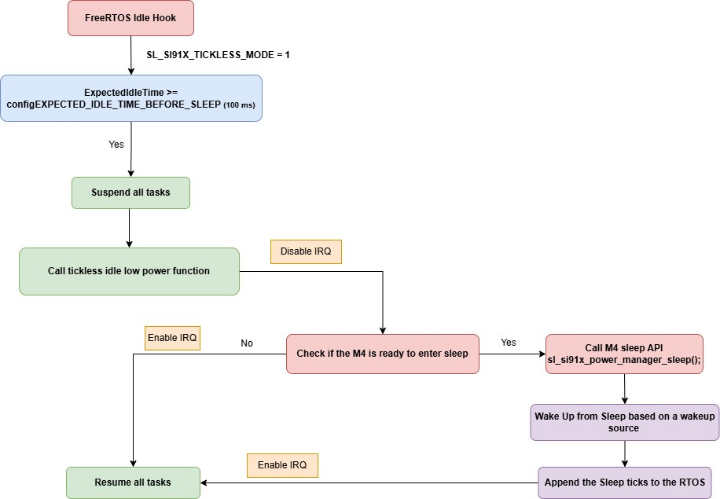
The application tasks call
osDelay, vTaskDelay, osSemaphoreAcquireor other blocking functions, leading the scheduler to consider them idle. When there are no tasks to be executed, the application will execute FreeRTOS idle hook.The application checks if the expected idle time is greater than or equal to a predefined threshold (configEXPECTED_IDLE_TIME_BEFORE_SLEEP), which is set to 100 milliseconds. If the condition is met, the application suspends all tasks.
The application then calls a function specifically designed to handle the M4 transition to low power mode
portSUPPRESS_TICKS_AND_SLEEP( xExpectedIdleTime )and IRQs are disabled to ensure that no interrupts occur while the system is preparing to enter low power mode.Then the application checks for the following before letting M4 go to sleep,
Check Active Events: It checks if any ongoing tasks or operations require the system to remain active, for example, data transmission, sensor readings, or critical computation. Also checks if there is any requirement added, and the device goes to sleep if there is no power manager requirement added.
System Flags: Internal flags or states that indicate whether it is appropriate to sleep or not are likely checked. Checking the pending packets from NWP while M4 going to sleep.
Flash operation: Check if there are any flash write operations like NVM command is in progress and the device goes to sleep if there are no flash operations.
If the M4 processor is ready to go to sleep mode, it calls the M4 sleep API (sl_si91x_power_manager_sleep()) to put the M4 processor into sleep mode.
The M4 processor wakes up from sleep mode when a predefined wakeup source triggers it. Once it wakes up, the duration for which the system was in sleep mode (known as sleep ticks) is added to the RTOS.
IRQs are enabled after the system wakes up from sleep mode and all tasks that were suspended are resumed, and the application continues normal operation.
Note:
The user must be cautious when using
_osSemaphoreAcquire_and_osDelay_, as the M4 enters sleep during this configured delay time and will not serve any event interrupts.Power Manager component shall install the wireless wake-up and SysRTC component for sleeptimer as wake-up resource by default. It is highly recommended not to install these components explicitly.
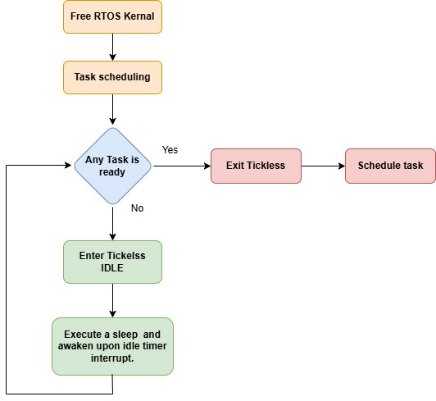
If no tasks are ready to run, the kernel enters tickless idle mode. The system wakes up upon sleep timer expiration or any wake-up source configured. Here's a basic flow chart to illustrate the system’s behavior.
Note: Users can take SL POWER MANAGER TICKLESS IDLE existing application in WiSeConnect release as reference, which demonstrates the power manager service APIs, state transitions(PS4, PS3 and PS2) and sleep-wake up (PS4, PS3 and PS2 sleep with RAM retention) with tickless idle mode.
Use Cases#
Application with Peripheral only#
Tickless idle mode activates sleep functionality automatically when scheduler goes to idle, Power Manager has APIs that prevents the system from entering sleep mode.
When a requirement is added for a power state, then the system is prevented from entering sleep as there is a requirement higher than sleep mode is added. Make sure to remove the higher requirement added if the user wants to let the M4 enter sleep mode in tickless idle mode. For instance, during data transmission on a USART, the system can enter sleep mode if there is any delay during transmission. To address this, the Power Manager adds a requirement on PS4 before initiating the transfer and removes the requirement once the transfer is complete, thereby preventing the M4 from entering sleep mode.
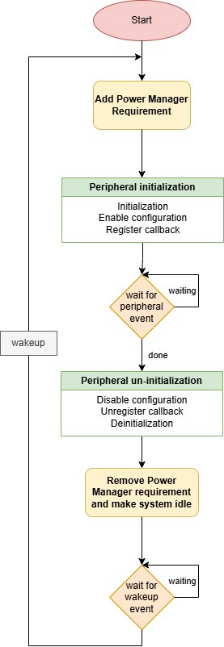
Below is the flow for how to handle peripherals across sleep wakeups with tickless idle.
Application with Wireless Functionalities and Peripherals#
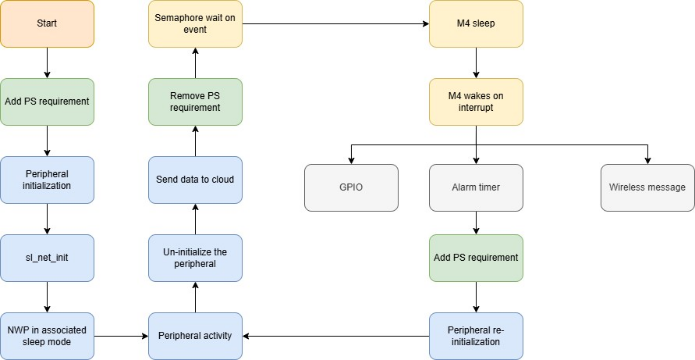
A sequence flow illustrating a use case for wireless applications that utilize peripherals with tickles idle mode.
Power state (PS4) requirement is added to prevent the M4 entering sleep during any delay unintended.
The SiWG917 initializes the NWP and M4 peripheral.
The NWP is configured as a WLAN station, connects to an Access Point (AP) and establishes a connection to the Cloud.
The NWP is set to Connected Power Save mode (Associated Power Save).
The peripheral activity is carried out and data is collected. The peripheral is un-initialized before entering M4 sleep.
The power state requirement is removed allowing the M4 to enter sleep.
The M4 is waiting on a semaphore with defined wait time. The RTC timer, UULP GPIO, and Wireless message are defined as wakeup sources.
The M4 enters last active state (PS4) sleep mode with retention as the scheduler is idle.
Upon a GPIO interrupt/ RTC timer expiry/ wireless message/ semaphore wait time expiry, the M4 wakes up.
Upon M4 wakeup, add the power state requirement (PS4).
For performing the peripheral activity again, re-initialize the peripheral and execution continues from step 5.