Sequence Diagram#
On boot up the power manager starts with PS3 powersave state (40MHz) and after that application adds its required state through API calls.
The sequence diagram for transition from PS3 to PS2 state is as follows.
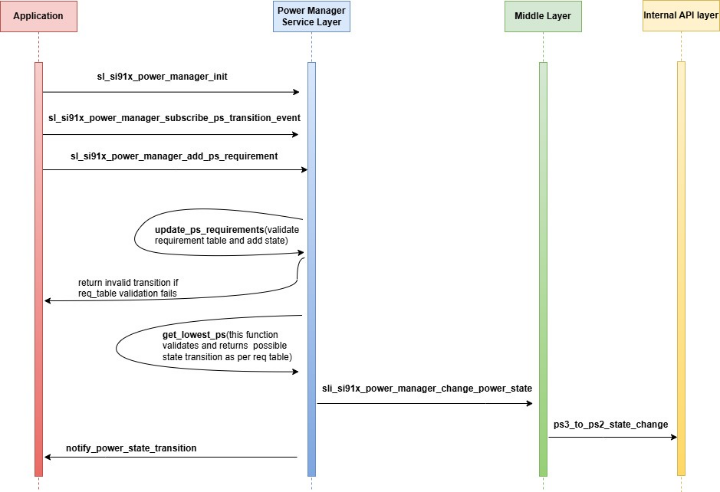
The Power Manager service is initialized by default using the sl_si91x_power_manager_init() function, which sets the processor to the PS3 state with a clock speed of 40 MHz (Power Save). All possible events are subscribed to using the sl_si91x_power_manager_subscribe_ps_transition_event() function, which includes the callback function address.
To add a requirement for the PS2 state, the sl_si91x_power_manager_add_ps_requirement() function is used. The sli_si91x_power_manager_update_ps_requirement() function then updates the power state requirement, current state, and requirement table, ensuring that the added requirement is a valid transition.
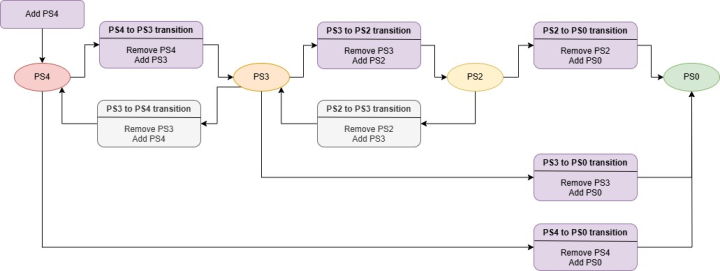
The sl_si91x_get_lowest_ps() function validates all power state requirements and returns the possible state transition based on the state hierarchy. For example, if both PS4 and PS2 state requirements are added, the function will return PS4 as the possible transition since it is considered higher than PS2. The system will not transition to PS2 until the PS4 requirement is removed. However, here as only the PS2 state requirement is added, the function will return PS2 as the possible transition.
Finally, the sli_si91x_power_manager_change_power_state() function updates the power state from PS3 to PS2, and the ps3_to_ps2_state_change() function executes this transition using internal APIs.
Power State Transitions#
This section provides a simple illustration for power state transition using Power Manager APIs.
To add a power state requirement -
sl_si91x_power_manager_add_ps_requirement (sl_power_state_t stateTo remove a power state requirement -
sl_si91x_power_manager_remove_ps_requirement(sl_power_state_t state);The power states are,
SL_SI91X_POWER_MANAGER_PS0 – PS0 Power StateSL_SI91X_POWER_MANAGER_PS2 - PS2 Power StateSL_SI91X_POWER_MANAGER_PS3 - PS3 Power StateSL_SI91X_POWER_MANAGER_PS4 - PS4 Power State
Note:
Requirement table stores the requirements for each power state and based on that power manager decides the current state.
sl_si91x_power_manager_get_requirement_tableAPI is used to get the current requirements on all the power states.If a task wants to enter a low power mode (such as PS3 or PS2), it first checks if any other task has a higher requirement.
When multiple tasks request a state transition, the Power Manager maintains the possible state transitions. It is recommended that a task checks the requirement table before switching and performs the state change accordingly.