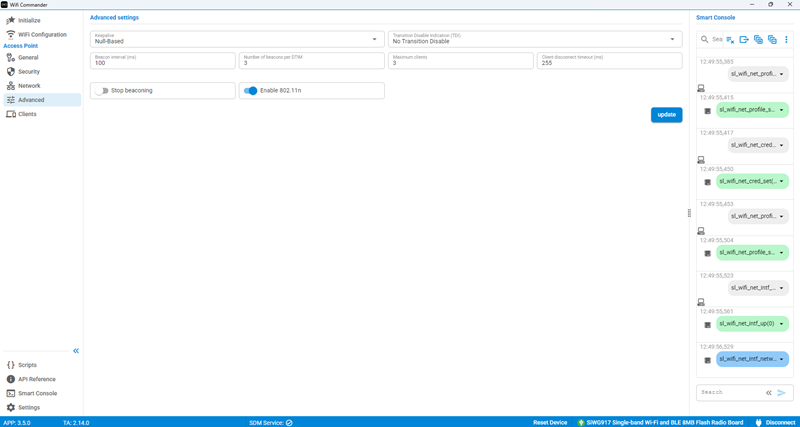
Advanced Settings#
Use Advanced Settings to configure the following options:
Keepalive
Transition Disable Indication (TDI)
Beacon Interval
Number of Beacons per DTIM
Maximum Clients
Client Disconnected Timeout (ms)
Stop Beaconing
Enable 802.11n
Keepalive#
The following keepalive modes are supported:
Disable
Deauth-Based
Null-Based
Transition Disable Indication (TDI)#
The following TDI modes are supported:
No Transition Disable
WPA3-SAE Transition Disable
Beacon Interval#
The Beacon Interval defines how often a Wi-Fi access point (AP) broadcasts beacon frames to announce its presence and provide network information to nearby wireless devices.
Number of Beacons per DTIM#
The Number of Beacons per DTIM, also known as the DTIM period, specifies how many beacon intervals occur before the access point (AP) sends a Delivery Traffic Indication Message (DTIM).
Maximum Clients#
The Maximum Clients setting specifies the maximum number of wireless devices that can be associated with a Wi-Fi access point (AP) or a specific SSID at the same time.
Client Disconnected Timeout (ms)#
The Client Disconnected Timeout specifies the amount of time, in milliseconds, that the access point (AP) waits before removing a client from its association table after the client becomes inactive or is determined to be disconnected.
Stop Beaconing#
Use this option to enable or disable beacon transmissions.
Enable 802.11n#
Use this option to enable or disable 802.11n support.