


Scan and Connect Parameter Tuning#
This section describes how key scan and connection parameters influence behavior, performance, and reliability. Use it to tune scanning and connection for your use case (speed, power, roaming, or robustness).
For structure, API details and use cases, see Initialization and Configuration, Scanning, Connection and Use Cases.
Overview#
You can get the requied effect by selecting the parameters:
Scan duration and completeness: Channel bitmap, channel dwell times, and scan type determine how long a scan runs and how many APs are found.
Connection speed: Channel bitmap and optional channel in the client configuration limit the internal scan performed by sl_wifi_connect, reducing time to connect.
Roaming and reconnection: Advanced scan configuration (trigger levels, instant scan) and advanced client configuration (retries, beacon missed count, scan interval) control when the device rescans or rejoins.
Power and regulatory: Passive scan, low-power mode, and listen interval reduce power; transmit power during scan/join affects range and compliance.
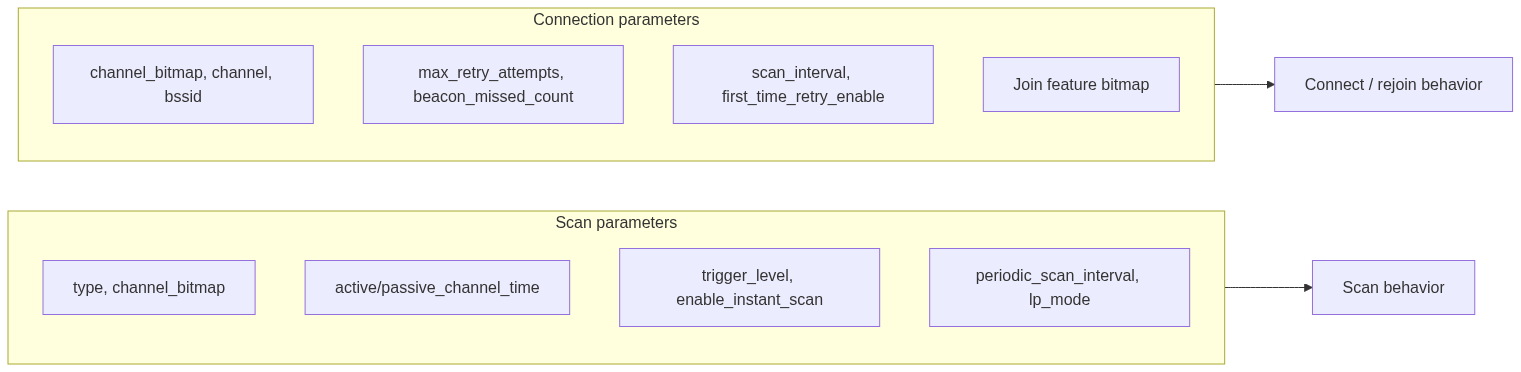
The following diagram shows where these parameters apply in the flow.
Scan Parameter Effects#
Scan type (type field in sl_wifi_scan_configuration_t)#
Type | Effect on functionality |
|---|---|
ACTIVE | Sends probe requests; fast discovery. Default channel dwell is 100 ms (configurable). Use for pre-connection discovery. Supported in AP mode. |
PASSIVE | No transmission; listens for beacons only. Lower power, regulatory-friendly. Default dwell 400 ms. Use |
EXTENDED | Active scan with results stored in the module; not limited to 11 APs. Callback signals completion; retrieve with sl_wifi_get_stored_scan_results. More memory use (~42 bytes per AP). Use in dense environments. |
ADV_SCAN | Background scan while connected. Requires device to be connected first. Start immediately with |
Channel Bitmap (channel_bitmap_2g4 field in sl_wifi_scan_configuration_t)#
0: Scan all 2.4 GHz channels (channels 1–14). Most complete, slowest.
Single channel: For example,
(1 << 5)for channel 6. When combined with an optional SSID in sl_wifi_start_scan, Quick Scan is enabled: the device scans only that channel for that SSID and can return as soon as the AP is found, reducing scan time.Subset of channels: For example,
(1 << 0) \| (1 << 5) \| (1 << 10)for 1, 6, 11. Faster than all-channel scan, but might miss APs on other channels.Advanced (background) scan: The channel bitmap is fixed at the first ADV_SCAN start; it cannot be changed for subsequent background scans.
Practical effect: Use a single channel + SSID for fastest discovery when the AP channel is known. Use a subset or all channels when the AP channel is unknown or for full discovery.
Channel Dwell Times (active_channel_time / passive_channel_time fields in sl_wifi_advanced_scan_configuration_t)#
Configured via sl_wifi_set_advanced_scan_configuration with sl_wifi_advanced_scan_configuration_t:
Parameter | Default | Effect |
|---|---|---|
active_channel_time | 100 ms | Time per channel during active scan. Also applies to the internal scan performed by sl_wifi_connect when set to a non-default value. Shorter = faster scan, might miss weak or busy APs; longer = more thorough. |
passive_channel_time | 400 ms | Time per channel during passive scan and during Advanced (background) scan passive phase. Same trade-off: shorter = faster, longer = more complete. |
If these are set to 0 or left at default sentinel values, the firmware uses the above default values. Setting active_channel_time before sl_wifi_connect can speed up or slow down the internal scan used for connection.
Advanced Scan Parameters (trigger_level, trigger_level_change, enable_instant_scan, enable_multi_probe fields in sl_wifi_advanced_scan_configuration_t)#
Used only for SL_WIFI_SCAN_TYPE_ADV_SCAN (device must be connected):
Parameter | Effect |
|---|---|
trigger_level | RSSI (dBm) threshold. When connected RSSI drops below this value, a background scan is triggered to find better APs (roaming). Typical range: -10 to -100 dBm. |
trigger_level_change | RSSI delta (dB). When connected RSSI drops by this amount from the previous level, a background scan is triggered. Fine-tunes roaming sensitivity. |
enable_instant_scan | When 1, advanced scan starts immediately and the callback is invoked once with up to 11 APs. Background scanning then continues. When 0, scan starts only when |
enable_multi_probe | When 1, probe requests are sent to all APs in addition to the connected SSID; can improve discovery of neighboring APs for roaming. |
periodic_scan_interval | In |
Practical effect: For roaming, set trigger_level and optionally trigger_level_change so that scans start when link quality degrades. Use enable_instant_scan = 1 if you need an initial set of results in the callback; use 0 for pure background roaming with no result callback.
Other Scan-Related Settings (lp_mode field in sl_wifi_scan_configuration_t)
lp_mode (in
sl_wifi_scan_configuration_t) – Enable low-power chain during passive scan to reduce power.Scan transmit power – sl_wifi_set_max_tx_power with
scan_tx_power. Higher power can improve discovery range; lower power can reduce interference and meet regulatory limits.
Connection Parameter Effects#
Channel Bitmap and Channel (channel_bitmap / channel fields in sl_wifi_client_configuration_t)#
channel_bitmap: Limits the internal scan performed by sl_wifi_connect to the specified 2.4 GHz channels (
channel_bitmap.channel_bitmap_2_4). Same bit layout as scanchannel_bitmap_2g4.
Effect: Restricting to the actual AP channel(s) reduces connection time. Using wrong or too-narrow channels can prevent the device from finding the AP and cause connection failure.channel: Optional specific channel. When set, the stack can use it to narrow or skip scan on other channels, speeding connect when the AP channel is known.
Practical effect: When the AP channel is known, set channel_bitmap to that channel (or a small set including it) for faster connect. When unknown, leave channel bitmap zero (scan all channels) or use a common subset (e.g., 1, 6, 11).
BSSID and Join Feature#
bssid: MAC address of the target AP. Requires the join feature SL_WIFI_JOIN_FEAT_BSSID_BASED to be set via sl_wifi_set_join_configuration, otherwise, the BSSID may be ignored.
Effect: Connects to a specific AP (e.g., in multi-AP deployments or to avoid roaming to another AP).
Advanced Client Configuration (sl_wifi_set_advanced_client_configuration)#
Parameter | Default | Effect |
|---|---|---|
max_retry_attempts | 20 | Number of join/rejoin retries after failure. When 0, retry indefinitely. Affects both reconnection after disconnect and (if |
scan_interval | — | Interval in seconds between scan/retry attempts during rejoin. Ignored if SL_WIFI_JOIN_FEAT_QUICK_JOIN is set in the join feature bitmap. |
beacon_missed_count | 40 | Number of missed beacons before the device considers the link lost and triggers rejoin. Minimum value is 40. Lower values (if allowed) would mean faster detection of link loss but more sensitivity to temporary fades. |
first_time_retry_enable | 0 | When 0, the first connection attempt has no retries, API returns failure immediately on first join failure. When 1, the first connection uses |
Practical effect: Increase max_retry_attempts (or set to 0) for unreliable environments. Use first_time_retry_enable = 1 to allow retries on initial connect. Use SL_WIFI_JOIN_FEAT_QUICK_JOIN to speed rejoin by skipping the normal scan interval between retries.
Join Feature Bitmap (sl_wifi_set_join_configuration)#
SL_WIFI_JOIN_FEAT_LISTEN_INTERVAL_VALID: Use listen interval from join (e.g., from sl_wifi_set_listen_interval_v2). Affects power saving.
SL_WIFI_JOIN_FEAT_QUICK_JOIN: Rejoin uses quick join;
scan_intervalin advanced client config is not used between retries. Faster reconnection.SL_WIFI_JOIN_FEAT_BSSID_BASED: Required when connecting with a specific
bssidin client configuration.SL_WIFI_JOIN_FEAT_MFP_CAPABLE_ONLY / SL_WIFI_JOIN_FEAT_MFP_CAPABLE_REQUIRED: MFP (management frame protection) behavior.
Join Transmit Power#
sl_wifi_set_max_tx_power with join_tx_power – Transmit power during join. Higher can improve connection reliability in weak signal conditions; lower can reduce interference and meet regulatory limits.
Internal Scan During Connection#
sl_wifi_connect always performs an internal scan before joining. It cannot be disabled.
Inputs used: SSID and channel_bitmap (and optional channel) from
sl_wifi_client_configuration_t.Channel time: If
active_channel_timewas set via sl_wifi_set_advanced_scan_configuration to a non-default value, it is used for this internal scan; otherwise the default (e.g. 100 ms) applies.Effect of parameters: Providing a narrow, correct
channel_bitmap(and optionallychannel) reduces internal scan time and speeds connection. Wrong or missing channel info can increase connect time or cause failure.
Quick Reference to Parameters#
Goal | Parameters to consider |
|---|---|
Faster scan | Single channel + SSID (Quick Scan), subset channel bitmap, shorter |
More complete scan | All channels ( |
Faster connection | Set |
Lower power | Passive scan, |
Roaming / background scan | ADV_SCAN with |
Robust reconnection | Higher |
Connect to specific AP | Set |