


Wi-Fi Scan and Connect Debugging and Error Handling#
This section provides instructions for troubleshooting, handling error codes, and applying best practices for Wi-Fi scanning and connection. It also summarizes limitations that affect scan and connect behavior.
For more detailed limitations and recovery options, see the Appendix.
Common Debugging Tips#
Scan not starting: Ensure that Wi-Fi is initialized and the interface is up. For Advanced scan, ensure the device is already connected. Register the scan callback before calling sl_wifi_start_scan.
No scan results: For standard scans, check the callback is registered and that you are handling the completion status. For Extended scan, call sl_wifi_get_stored_scan_results after the callback indicates completion. For Advanced scan with no results, set
enable_instant_scan = 1if you expect one immediate result set.Connection fails: Verify credentials are set and credential_id matches. Ensure security and encryption match the network. For BSSID-based connection, set
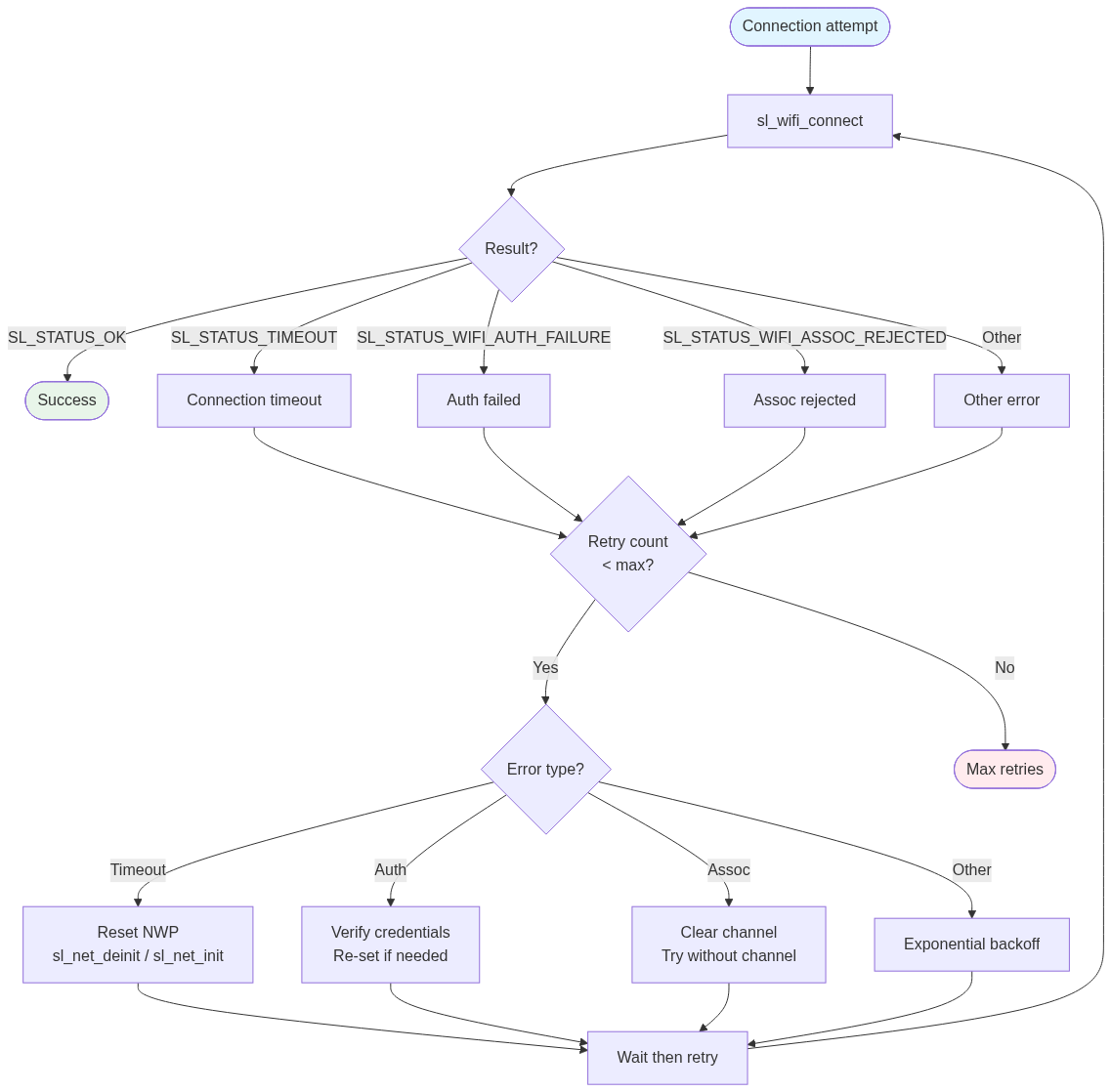
SL_WIFI_JOIN_FEAT_BSSID_BASED. Check that the connection timeout is long enough (internal scan can take up to 60 s).Connection timeout: Internal scan runs before join; allow at least 30 seconds for normal cases and up to 120 seconds for worst case. After timeout, consider NWP reset (sl_net_deinit / sl_net_init) before retry.
Scan issued while connected: Regular (non-Advanced) scan is not allowed when associated. Use
SL_WIFI_SCAN_TYPE_ADV_SCANfor background scanning while connected.
Connection Failure Recovery Flow#
The following flowchart illustrates how to handle connection results and apply retry or recovery strategies based on the error type.
Error Code Handling#
The Wi-Fi APIs return sl_status_t values. Always check return values and implement recovery where appropriate.
Complete Scan Error Codes Reference#
Status | Meaning | Action |
|---|---|---|
SL_STATUS_OK | Success | Continue. |
SL_STATUS_IN_PROGRESS | Scan started (async) | Wait for callback. |
SL_STATUS_INVALID_PARAMETER | Bad parameters | Check configuration and pointers. |
SL_STATUS_NOT_READY | Interface or system not ready | Ensure init and interface up. |
SL_STATUS_SI91X_SCAN_ISSUED_IN_ASSOCIATED_STATE | Scan issued while connected (non-Advanced) | Use Advanced scan for background scan. |
SL_STATUS_SI91X_BG_SCAN_NOT_ALLOWED | Background scan not allowed (e.g., channel) | Adjust channel bitmap or use foreground scan. |
Complete Connect Error Codes Reference#
Status | Meaning | Action |
|---|---|---|
SL_STATUS_OK | Connected | Continue. |
SL_STATUS_TIMEOUT | Connection or internal scan timeout | Increase timeout; consider NWP reset and retry. |
SL_STATUS_WIFI_AUTH_FAILURE | Authentication failed | Verify credentials and security type. |
SL_STATUS_WIFI_ASSOC_REJECTED | Association rejected | Try without specific channel; check AP capability. |
SL_STATUS_INVALID_PARAMETER | Invalid client config | Check SSID, security, credential_id. |
Best Practices#
Scanning#
Use the recommended callback API: sl_wifi_set_scan_callback_v2.
For quick discovery when SSID and channel are known, use targeted scan (optional_ssid + single channel bitmap).
Limit channels with
channel_bitmap_2g4to reduce scan time when possible.For low power, use Passive scan and consider
lp_modeand lower scan TX power.For Advanced scan, set
enable_instant_scan = 1if you need one immediate result set; otherwise scan starts when trigger_level is met and may not deliver results in the callback.Retrieve Extended scan results with sl_wifi_get_stored_scan_results before starting another Extended scan (results are overwritten).
Connection#
Set credentials before calling connect; use sl_net_set_credential for PSK when possible.
Use a connection timeout of at least 30 seconds (typical) or 120 seconds for worst case; account for internal scan (e.g., up to 60 seconds).
Set
channel_bitmap.channel_bitmap_2_4to known channels to speed internal scan; single channel is fastest when known.When using BSSID, always set
SL_WIFI_JOIN_FEAT_BSSID_BASEDvia sl_wifi_set_join_configuration.Register sl_wifi_set_join_callback_v2 for reliable event handling and for asynchronous connect.
For Enterprise (EAP), set
encryptionto match the inner method and use sl_wifi_set_credential for EAP credentials.
Limitations#
Internal scan: Always performed by sl_wifi_connect.You cannot disable this scan. Only SSID and channel bitmap are configurable. You cannot select the scan type for this internal scan. Internal scan wait is fixed (e.g., 60 seconds).
5 GHz / DFS: 5 GHz and DFS channel support are not supported; only 2.4 GHz channels (1–14) for scanning.
Standard scans: Active, Passive, and Extended scans cannot be stopped. Use Advanced scan if you need start/stop control.
Scan while connected: Only Advanced scan is allowed when associated, standard scans return an error.
Result count: Non-Extended scans return at most 11 APs. Use Extended scan for more, then sl_wifi_get_stored_scan_results.
AP mode: Only Active scan is supported after sl_wifi_start_ap; Advanced scan not supported in AP mode.
Deprecated / unsupported: sl_wifi_set_scan_callback is deprecated (use v2); sl_wifi_wait_for_scan_results is not supported.
Client options / join with scan flag:
client_optionsandSL_WIFI_JOIN_WITH_SCANare not supported; internal scan always runs.