


Wi-Fi Scan and Connect Initialization and Configuration#
This section describes how to initialize the Wi-Fi subsystem and bring up the interface before performing scans or connections. It covers the startup sequence and prerequisites for scan and connect operations.
This section also describes the main configuration structures and options for Wi-Fi scanning and connection. These structures are typically filled by the application and passed to the scan and connect APIs.
For detailed information on how these parameters affect scan duration, connection latency, roaming behaviour, and power consumption, see Scan and Connect Parameter Tuning.
Startup Sequence#
When the application starts, the Wi-Fi stack must be initialized and the client interface brought up before any scan or connect operation. The following flowchart illustrates the startup sequence.
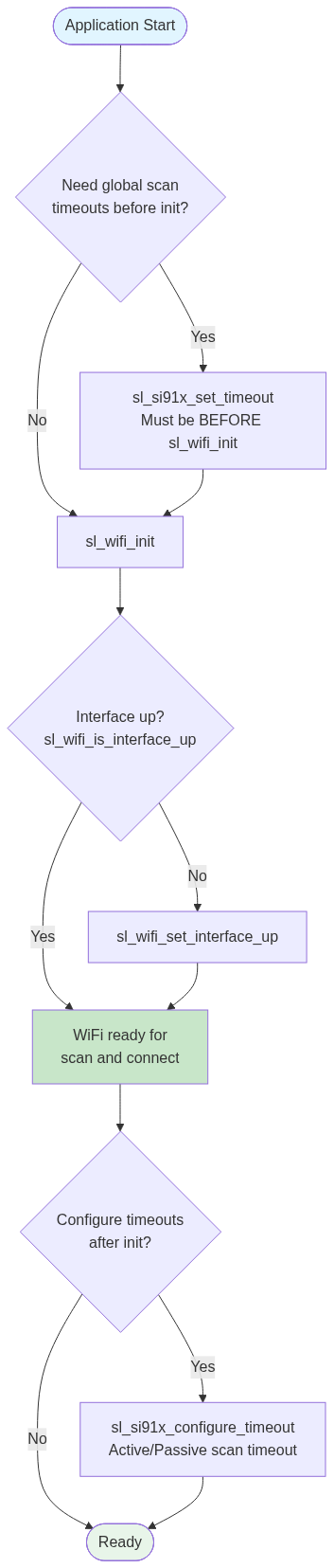
Initialize WiFi – Call sl_wifi_init. This initializes the Wi-Fi subsystem and network processor (NWP).
Check interface – Call
sl_wifi_is_interface_up(SL_WIFI_CLIENT_2_4GHZ_INTERFACE)(or the interface you use) — see sl_wifi_is_interface_up.Bring interface up if needed – If the interface is not up, call
sl_wifi_set_interface_up(SL_WIFI_CLIENT_2_4GHZ_INTERFACE)— see sl_wifi_set_interface_up.Optional: Configure scan timeouts – Configure scan channel timeouts based on application requirements: To set global scan timeouts before init, use sl_si91x_set_timeout before sl_wifi_init. To configure timeouts after init, use sl_wifi_configure_timeout.
Prerequisites for Scanning and Connection#
Before using Wi-Fi scan or connect APIs:
Wi-Fi module: Initialize with sl_wifi_init.
Interface state: Ensure the Wi-Fi client interface is up. Check with sl_wifi_is_interface_up; bring it up with sl_wifi_set_interface_up if needed.
Credentials (for connection): Set credentials (e.g., sl_net_set_credential or sl_wifi_set_credential) before calling connect.
Advanced scan only: The device must already be connected to an AP before starting Advanced scan.
Initialization Example#
#include "sl_wifi.h"
void wifi_init_sequence(void)
{
sl_status_t status = sl_wifi_init();
if (status != SL_STATUS_OK) {
// Handle initialization failure
return;
}
sl_wifi_interface_t interface = SL_WIFI_CLIENT_2_4GHZ_INTERFACE;
if (!sl_wifi_is_interface_up(interface)) {
status = sl_wifi_set_interface_up(interface);
if (status != SL_STATUS_OK) {
// Handle interface bring-up failure
return;
}
}
// Wi-Fi is ready for scan and connect operations
}Note:
Client interfaces:
SL_WIFI_CLIENT_2_4GHZ_INTERFACE,SL_WIFI_CLIENT_5GHZ_INTERFACE– used to connect to access points.AP interface:
SL_WIFI_AP_INTERFACE– used when the device operates as an access point. Scanning in AP mode is supported only as Active scan after sl_wifi_start_ap is called.
Use the client interface for typical scan-and-connect flows.
Configuration Overview#
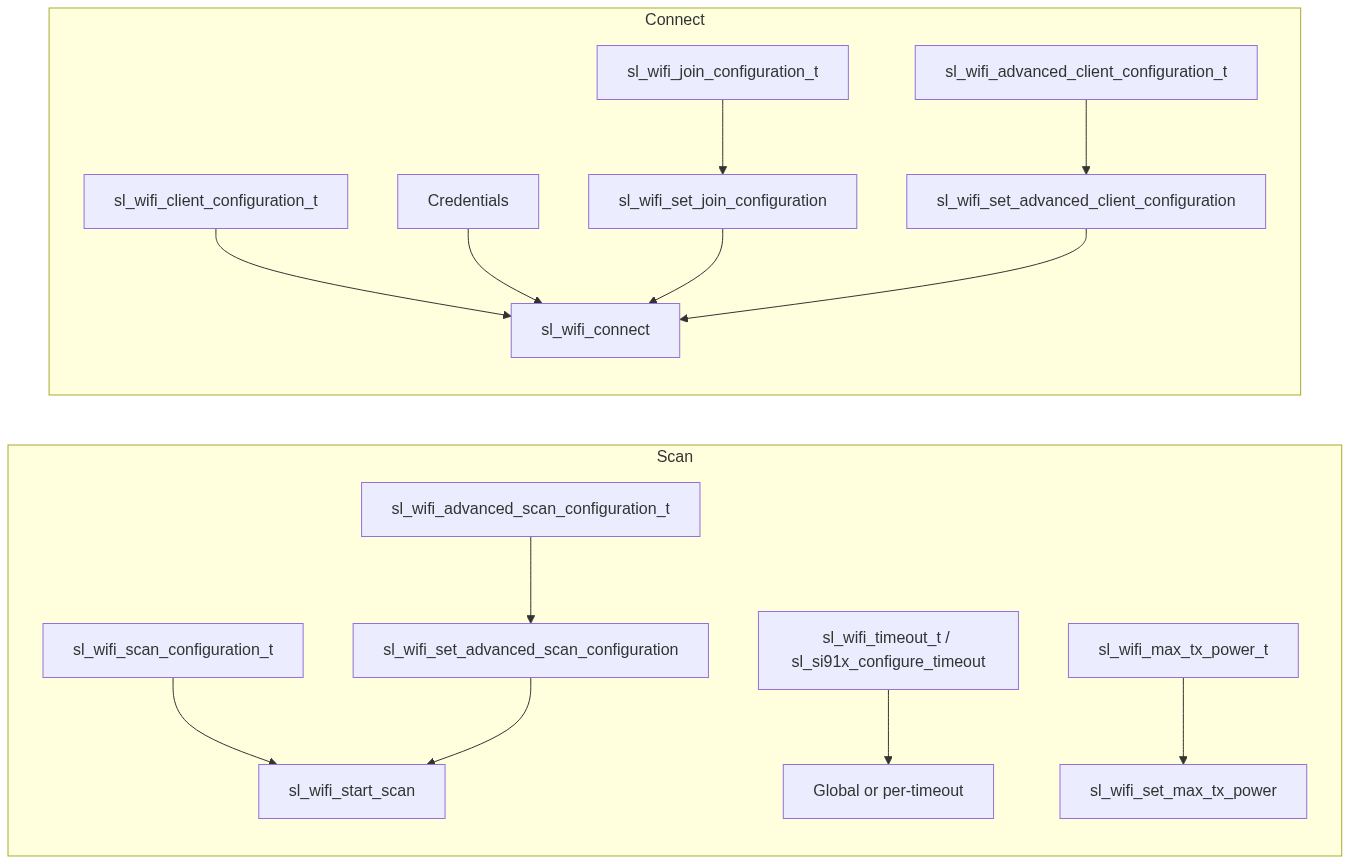
The following diagram shows where each configuration type is used in the scan and connect flow.
Scan Configuration#
sl_wifi_scan_configuration_t#
Field | Description |
|---|---|
type |
|
channel_bitmap_2g4 | 2.4 GHz channels (bits 0–13 = channels 1–14). Use 0 for all channels. |
periodic_scan_interval | For Advanced scan only: interval in milliseconds between periodic scan cycles. |
lp_mode | 1 = enable low-power mode for passive scan. |
flags | Reserved; set to 0. |
channel_bitmap_5g | 5 GHz; not supported; set to 0. |
Default: use default_wifi_scan_configuration and set type and other fields as needed.
sl_wifi_advanced_scan_configuration_t#
Used for channel times (all scan types) and for Advanced-scan-specific parameters:
Field | Description |
|---|---|
active_channel_time | Dwell time per channel for active scan (ms). Default 100. Used for standard and internal scans. |
passive_channel_time | Dwell time per channel for passive scan (ms). Advanced scan only; default 400. |
trigger_level | RSSI (dBm) below which Advanced scan triggers. Advanced scan only. |
trigger_level_change | RSSI delta (dB) that triggers background scan when connected RSSI drops by this amount. Advanced scan only. |
enable_instant_scan | 1 = start Advanced scan immediately and deliver one result set. Advanced scan only. |
enable_multi_probe | Advanced scan only; multiple probes. |
Configure with sl_wifi_set_advanced_scan_configuration before starting a scan or before calling sl_wifi_connect if you want to influence internal scan channel time.
Timeout Configuration#
Global timeouts#
Use sl_wifi_timeout_t with sl_si91x_set_timeout. Must be called before sl_wifi_init.
active_chan_scan_timeout_value – Active scan channel time (ms).
passive_scan_timeout_value – Passive scan channel time (ms).
Per-timeout#
Use sl_si91x_configure_timeout with:
SL_SI91X_CHANNEL_ACTIVE_SCAN_TIMEOUT– Active channel time (ms).SL_SI91X_CHANNEL_PASSIVE_SCAN_TIMEOUT– Passive channel time (ms).
Extended Scan Result Filters#
When calling sl_wifi_get_stored_scan_results, use sl_wifi_extended_scan_result_parameters_t:
scan_results – Array to store results.
array_length – Size of array.
result_count – Output: number of results.
channel_filter – Optional; filter by channel.
rssi_filter – Optional; minimum RSSI (dBm).
security_mode_filter – Optional; filter by security.
network_type_filter – Optional; filter by network type.
Set filter pointers to NULL to disable filtering.
Scan Transmit Power#
Use sl_wifi_set_max_tx_power with sl_wifi_max_tx_power_t:
scan_tx_power – Transmit power during scan (1–31 dBm). Applies to all scans.
join_tx_power – Transmit power during join (1–31 dBm).
Optional: Global Scan Timeout#
If you need to set global active and passive scan channel times before Wi-Fi init:
sl_wifi_timeout_t timeout_config = {
.active_chan_scan_timeout_value = 150, // ms
.passive_scan_timeout_value = 500, // ms
.auth_assoc_timeout_value = SL_WIFI_DEFAULT_AUTH_ASSOCIATION_TIMEOUT,
.keep_alive_timeout_value = SL_WIFI_DEFAULT_KEEP_ALIVE_TIMEOUT
};
sl_si91x_set_timeout(&timeout_config);
// Then initialize WiFi
sl_wifi_init();Note: sl_si91x_set_timeout must be called before sl_wifi_init. To change scan timeouts after init, use sl_si91x_configure_timeout with
SL_SI91X_CHANNEL_ACTIVE_SCAN_TIMEOUTorSL_SI91X_CHANNEL_PASSIVE_SCAN_TIMEOUT.
Connect Configuration#
sl_wifi_client_configuration_t#
Field | Required | Description |
|---|---|---|
ssid | Yes | Target network SSID. |
security | Yes | Security type (WPA, WPA2, WPA3, Enterprise, OPEN). |
credential_id | Yes* | Credential ID; use |
channel | No | Specific channel. |
bssid | No | AP MAC; requires |
channel_bitmap | No | Limits internal scan to selected channels. Set |
encryption | No | Default |
bss_type | No | Not currently supported; infrastructure is used. |
client_options | No | Not currently supported. |
* Required for secured networks.
Join Feature Bitmap#
Configure join behavior with sl_wifi_set_join_configuration:
SL_WIFI_JOIN_FEAT_LISTEN_INTERVAL_VALID – Use listen interval from join (default).
SL_WIFI_JOIN_FEAT_QUICK_JOIN – Quick join;
scan_intervalin advanced client config is not used.SL_WIFI_JOIN_FEAT_BSSID_BASED – Required when connecting by BSSID.
SL_WIFI_JOIN_FEAT_MFP_CAPABLE_ONLY / SL_WIFI_JOIN_FEAT_MFP_CAPABLE_REQUIRED – MFP behavior.
Use sl_wifi_set_listen_interval_v2 when the listen interval is taken from the join command.
Advanced Client Configuration#
Use sl_wifi_set_advanced_client_configuration to set:
max_retry_attempts – Retries after first connection (0 = forever, 20 = default).
beacon_missed_count – Missed beacons before triggering rejoin (e.g., 40).
scan_interval – Active scan interval in seconds during rejoin (ignored if quick join is enabled).
first_time_retry_enable – Retry on first join failure.
Configure before connecting so that initial connection and rejoin use the desired behavior.
Connection with BSSID#
When connecting to a specific AP by MAC address:
Set
access_point.bssidto the AP MAC.Set join feature bitmap to include
SL_WIFI_JOIN_FEAT_BSSID_BASEDand call sl_wifi_set_join_configuration.Call sl_wifi_connect.
Without the BSSID join feature flag, the BSSID in the join command may be ignored.