


Combined Image (NWP + M4)#
The combined image is a single image which is obtained by combining the NWP and M4 images. The process of creating the combined image involves encrypting both the NWP and M4 images separately, and then adding a RPS header and signature. In case of non-secure firmware, signature is not added.
Combined Image RPS header format is same as the M4 RPS header format with few reserved bytes changed.
Signature for complete combined image is calculated and appended at the end of image.
MIC computation and signature maintains the integrity and confidentiality of the combined image.
Encryption of combined image is discarded as it would add overhead for firmware to decrypt and store into flash location. The NWP and M4 images are encrypted individually.
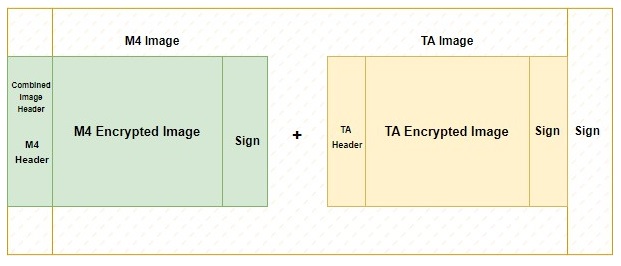
The following table lists the process to create and flash a combined image for Common Flash mode devices.
| Steps | Description | Security | Command (Syntax) |
|---|---|---|---|
| 1 | NWP Image with combined flag | Disabled |
commander rps convert <filename.rps> --taapp <original non-encrypted NWP rps> --combinedimage
|
| Enabled |
commander rps convert <filename.rps> --taapp <original non-encrypted NWP rps> --mic <keys.json> --encrypt <keys.json> --sign <keys.json> --combinedimage
|
||
| 2 | M4 Image with combined flag | Disabled |
commander rps convert <filename.rps> --app <original non-encrypted M4 rps> --combinedimage
|
| Enabled |
commander rps convert <filename.rps> --app <original non-encrypted M4 rps> --mic <keys.json> --encrypt <keys.json> --sign <keys.json> --combinedimage
|
||
| 3 | Combine NWP and M4 Images | Disabled |
commander rps convert <combined_image.rps> --app <m4_image_combinedflag.rps> --taapp <ta_image_combinedflag.rps>
|
| Enabled |
commander rps convert <combined_image.rps> --app <m4_image_combinedflag.rps> --taapp <ta_image_combinedflag.rps> --sign <keys.json>
|
||
| 4 | Flash the Combined Image | You can flash the combined image using the OTA process only. Refer to the HTTP OTAF example. | |